tuti – Tickets & Experiencias
- 0.0
- Rating
- 100.00K
- Installs
- Free
- Price

 Analysis by App-foxy
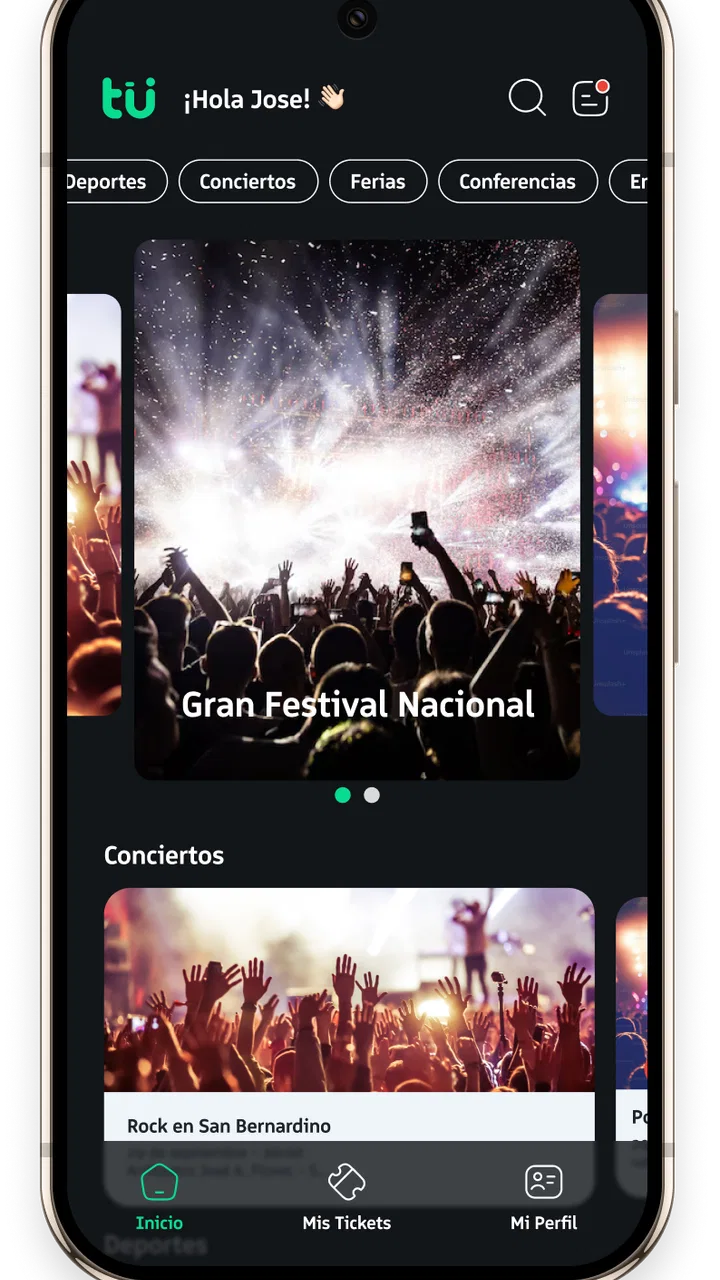
I approached tuti – Tickets & Experiencias as a practical question rather than a flashy promise: can a focused events app make buying a ticket in Paraguay feel simpler, while still giving me enough control to make a sensible decision? The app is built by Itti Digital S.A.E.C.A. and belongs to the events category, with a clear purpose around discovering and purchasing access to local happenings. That narrow focus is useful because it keeps the experience closer to a ticket counter than to a general social network.
My first impression is that tuti is aimed at people who already know they want to attend something, or who want a convenient way to browse available events without starting from several unrelated websites. It is free to install, rated for Everyone, and has passed the 100K+ install mark. Those details make it approachable for families, casual concertgoers, and people who do not want to commit to a paid service just to look around.
At the same time, a ticketing app deserves more caution than a simple entertainment app. A purchase involves money, personal details, timing, and sometimes a non-refundable decision. I therefore paid attention not only to the event-browsing idea, but also to the points where a user should slow down: account access, checkout information, ticket retrieval, and the choices presented before confirming a purchase. The most important strength here is convenience, but convenience should never replace checking the event details yourself.
You May Also Like

 Blood Strike: 2.5 Anniversary
Blood Strike’s Loadouts Turn Every Drop Into a Tactical Gamble
A close look at Blood Strike’s custom loadouts: how fast access to signature weapons reshapes its battle royale rhythm, rewards preparation, and narrows the gap between fights.

 Pandora - Music & Podcasts
Pandora’s Music Is Easy to Start, but Harder to Recover
Pandora’s strength is its low-effort path from a seed to a station. Its weak spot is how much confidence it asks you to place in connection, setup, and quiet recovery.

 8 Ball Pool
 Is Built on Rivalries, Rematches, and Routine
A close look at the rivalries, rematches, shared routines, and unanswered safety questions that turn a quick pool match into a persistent mobile community.

 Samsung Music
’s Quiet Strength Is Playing What You Already Own
Its reach comes less from spectacle than from dependable access to a personal library. That simplicity is both the app’s strongest retention engine and its ceiling.

 AccuWeather: Weather Radar
AccuWeather Review: A Quick, Clear Forecast for Everyday Decisions
For everyday plans, the best forecast is the one you can understand quickly. AccuWeather makes rain timing, radar, and local conditions easy to act on, with a few trade-offs.

 Hill Climb Racing
Why Hill Climb Racing Still Turns Crashes Into One More Run
A tiny car, a bumpy hill and one more upgrade: Hill Climb Racing keeps resurfacing because its simple chaos makes every near-miss feel personal.
More From Our News Desk



How tuti fits into the Paraguayan events experience
The central value is straightforward. Instead of searching through individual event pages, social posts, or physical sales points, I can use one app designed around tickets and experiences in Paraguay. That makes it especially appealing when an event is gaining attention and I want to move from “I might go” to “I have my ticket” without changing platforms several times.
Compared with buying through a venue’s own website, tuti can feel more useful when I am exploring several kinds of events rather than attending one familiar location. A venue page may be the better choice if I already trust that organizer and want every detail directly from the source. A general social platform may be better for discovering informal gatherings or reading conversation around an event. tuti makes more sense when the practical task is finding an available event and completing a ticket purchase in one dedicated place.
I would use it in a very ordinary situation: a friend sends me a message about an event happening soon, but the message contains only the name and a poster. I could open tuti, search for the event, compare the displayed information with the poster, and continue only after checking the date, location, ticket type, and conditions shown on the event page. That workflow is more reliable than purchasing from an unfamiliar forwarded link, because it gives me a defined place to verify what I am buying.
Still, a centralized catalog does not automatically mean every event will suit every user. The app’s usefulness depends on whether the particular event I want is available there and whether the listing contains the details I need. If I am looking for a small gathering sold directly by an organizer, a venue’s own channel may remain faster. I see tuti as a strong first stop for listed Paraguayan events, not as a guarantee that every possible event will appear in one place.
What the current release feels like to use
The current version is 1.1.2, and the app was released on September 16, 2025. I would treat it as a relatively young product rather than a decades-old ticketing institution. That is not automatically negative: newer apps can be more focused and less cluttered. But it does mean I would keep the app updated and avoid waiting until the last minute to solve an account or ticket problem before an important event.
Its minimum operating-system requirement is Android 7.0, which gives it a broad reach across older Android phones. That matters for an events service because not everyone replaces a phone frequently, and a ticket app is most useful when it works on the device a person already carries. I would nevertheless test the sign-in and ticket-display steps before leaving home, especially if I planned to rely on the phone at an entrance.
The app’s average rating is currently 0.0, so there is no meaningful rating signal for me to use when judging reliability. I would not interpret that number as praise or criticism. It simply means I should base my decision on the visible purchase flow, the clarity of each listing, and my own comfort with the choices presented rather than assuming a community consensus exists.
Trust begins with visible choices
For me, trust in a ticketing app is not created by polished colors or a short slogan. It comes from being able to understand what I am buying before money changes hands. With tuti, I would look for a clear event title, organizer or venue context, schedule, location, ticket category, final amount, and delivery or access instructions. If any of those points are difficult to find, I would pause and verify them through an independent event channel before paying.
I also prefer an app that lets me review an order before confirmation instead of rushing me from an event page directly into payment. The practical habit is simple: take a moment to check the selected quantity, ticket type, and event date on the final screen. This is particularly important when several sessions or categories look similar. A fast checkout is helpful only when it remains easy to correct a mistake.
Because tuti handles ticket purchases, I would also pay attention to account controls. I want to know which email address or phone number is attached to my account, where the ticket will appear after purchase, and how I can regain access if I change devices. I would keep the purchase confirmation and any ticket reference in a safe place rather than relying exclusively on a notification that might be buried later.
These are not abstract concerns. A ticket is often bought under time pressure, perhaps while friends are waiting or while availability appears limited. That is precisely when a user can overlook a seating condition, choose the wrong date, or enter an address they no longer use. My advice is to treat the review screen as part of the product, not as an annoying step between browsing and the event.
Handling personal and payment information carefully
Any ticket purchase can involve sensitive moments: creating an account, entering contact information, selecting a payment method, and receiving access credentials. I would enter only the information needed for the transaction and avoid using a shared or public device for checkout. On my own phone, I would use a screen lock and keep the operating system updated, because basic device security is part of protecting a digital ticket.
I would also inspect the permission requests shown by the app and grant only what makes sense for the task. An events app may be useful without broad access to unrelated areas of my phone, so I would not approve a request automatically just because I want to browse an event. If a permission appears optional, I would prefer to continue without it and check whether the core ticket workflow still works.
The same cautious approach applies to notifications. Event reminders can be useful, especially when a date is approaching, but I would decide whether I want promotional alerts as well as purchase-related messages. Separating those choices gives me a cleaner experience and makes it easier to notice an important ticket update. I would also review the app’s account and privacy screens directly, rather than assuming that a free download has no data implications.
I do not see “free” as meaning cost-free in every sense. The app itself does not charge an installation price, but tickets are a separate purchase decision, and any applicable checkout amount should be read carefully before confirmation. I would compare the final total with the event’s advertised price and keep the receipt. That small step can help identify an unexpected fee or a mismatch before the transaction is complete.
Where user agency matters most
The best ticketing workflow leaves the important decisions with me. I should be able to choose whether to create an account, decide which event to attend, select the ticket category, review the total, and control whether I receive nonessential notifications. tuti’s focused purpose gives it a chance to do this well, but I would judge the experience by how clearly those choices are presented rather than by how quickly I reach the checkout screen.
One useful habit is to separate discovery from purchase. I can browse an event first, save the details mentally or in my notes, and then return when I have confirmed the date with the people attending. This avoids buying impulsively because a listing looks urgent. It also helps when an event has multiple performances or different access types that are easy to confuse on a small screen.
Another practical tip is to open the ticket after buying it, while I still have a stable internet connection and time to troubleshoot. I would check whether the name, event, date, and ticket category match my intention. If the app provides an offline-accessible ticket, I would make sure it is actually available before traveling. If it requires an active connection, I would plan for that rather than discovering the requirement at the entrance.
For group plans, I would avoid assuming that one person’s phone solves everything. I would decide in advance who holds the tickets, whether the group enters together, and what happens if someone arrives separately. The app may simplify the purchase, but the social logistics still need a human plan. Sending the correct ticket information to the right person is more dependable than forwarding a series of screenshots without checking which ticket belongs to whom.
When tuti is the right choice
I think tuti is a good match for someone in Paraguay who wants a dedicated route to event tickets and prefers a mobile-first experience. It is particularly convenient for spontaneous plans, local entertainment searches, and situations where I do not want to create accounts across several unrelated event pages. The free app and Everyone age rating also make it easy to recommend as a starting point for a household, provided the adult making the purchase checks the transaction details.
It can also help people who are tired of relying on social posts as their only source of ticket information. A poster may be attractive but incomplete; a ticket-focused listing should be the place where I confirm the practical details before committing. Even then, I would compare the listing with the organizer’s public announcement when the event is important or expensive. That extra check costs little and protects against misunderstandings.
I would skip it, or at least use another channel first, if the event organizer explicitly sells tickets only through its own system, if I need a specialized seating map that is easier to inspect elsewhere, or if I cannot find clear cancellation and entry instructions. I would also avoid making a last-minute purchase through any app I have not tested if the event is about to begin. In that situation, a staffed venue counter or a familiar official seller may be the safer option.
Another trade-off is concentration. A dedicated app can make ticket buying feel organized, but it may not provide the broader conversation, reviews, or community context found on social platforms. If my main question is “Is this event worth attending?” rather than “Where can I buy the ticket?”, I would use other sources for opinions and return to tuti for the transaction only after verifying the essentials.
A measured verdict for everyday use
After looking at tuti as both an events tool and a purchase channel, I see a useful idea with a sensible local focus. It is free, accessible on older Android versions, and designed around a task many people want to complete quickly: finding and buying access to events in Paraguay. Its 100K+ installs suggest that the concept has reached a substantial audience, although the current 0.0 average rating gives me no dependable public signal about overall satisfaction.
My recommendation is cautious but positive. I would install it when I wanted a central place to look for Paraguayan events, and I would use it for a straightforward purchase after checking the listing and final order carefully. I would not treat it as a substitute for reading the organizer’s instructions, confirming the venue, or understanding the ticket conditions. The app can reduce friction; it cannot remove the responsibility of choosing the right event and protecting the account used to buy it.
In the end, tuti – Tickets & Experiencias is most convincing when I use it as a controlled buying tool rather than a reason to purchase impulsively. Keep notifications and permissions intentional, verify the ticket immediately, save the confirmation, and compare important details with the event’s official communication. With those habits, its focused approach can be genuinely convenient. Without them, the speed that makes ticketing attractive can also make a small mistake harder to fix.
FAQs for tuti – Tickets & Experiencias
01What is tuti – Tickets & Experiencias?
Tuti is an application designed to enhance your leisure and entertainment experiences by offering a wide variety of tickets and activities. Whether you're looking for concerts, theater performances, or unique local experiences, tuti provides a seamless platform to discover, book, and enjoy events tailored to your interests.
02How do I purchase tickets through the app?
Purchasing tickets on tuti is straightforward. After browsing available events, select your desired experience and follow the prompts to complete your purchase. The app supports various payment methods, ensuring a secure transaction. Once you've bought your tickets, they will be digitally stored within the app for easy access.
03Are there any additional fees when booking through tuti?
While tuti strives to offer competitive pricing, there may be service fees associated with certain bookings. These fees help support the platform's maintenance and development. Before finalizing a purchase, any additional costs will be clearly displayed, ensuring full transparency for users.
04Can I receive a refund if I can't attend an event?
Refund policies vary depending on the event provider and the type of ticket purchased. Tuti offers a section within each event listing that details the specific refund and cancellation policies. It's important to review these policies before purchasing to understand your options in case of changes to your plans.
05Is tuti available in multiple languages?
Yes, tuti aims to cater to a diverse audience by supporting multiple languages. The app's language settings can be adjusted in the preferences menu, allowing users to navigate the app in their preferred language, enhancing the overall user experience and accessibility.
Pros
- User-friendly interface enhances navigation.
- Wide variety of experiences available.
- Secure payment options for peace of mind.
- Real-time updates on events and tickets.
- Personalized recommendations improve choices.
Cons
- Limited availability in smaller cities.
- Occasional app crashes reported by users.
- High demand events sell out quickly.
- Customer support response can be slow.
- Some experiences lack detailed descriptions.

tuti – Tickets & Experiencias
Gallery